
Appearance
Settings
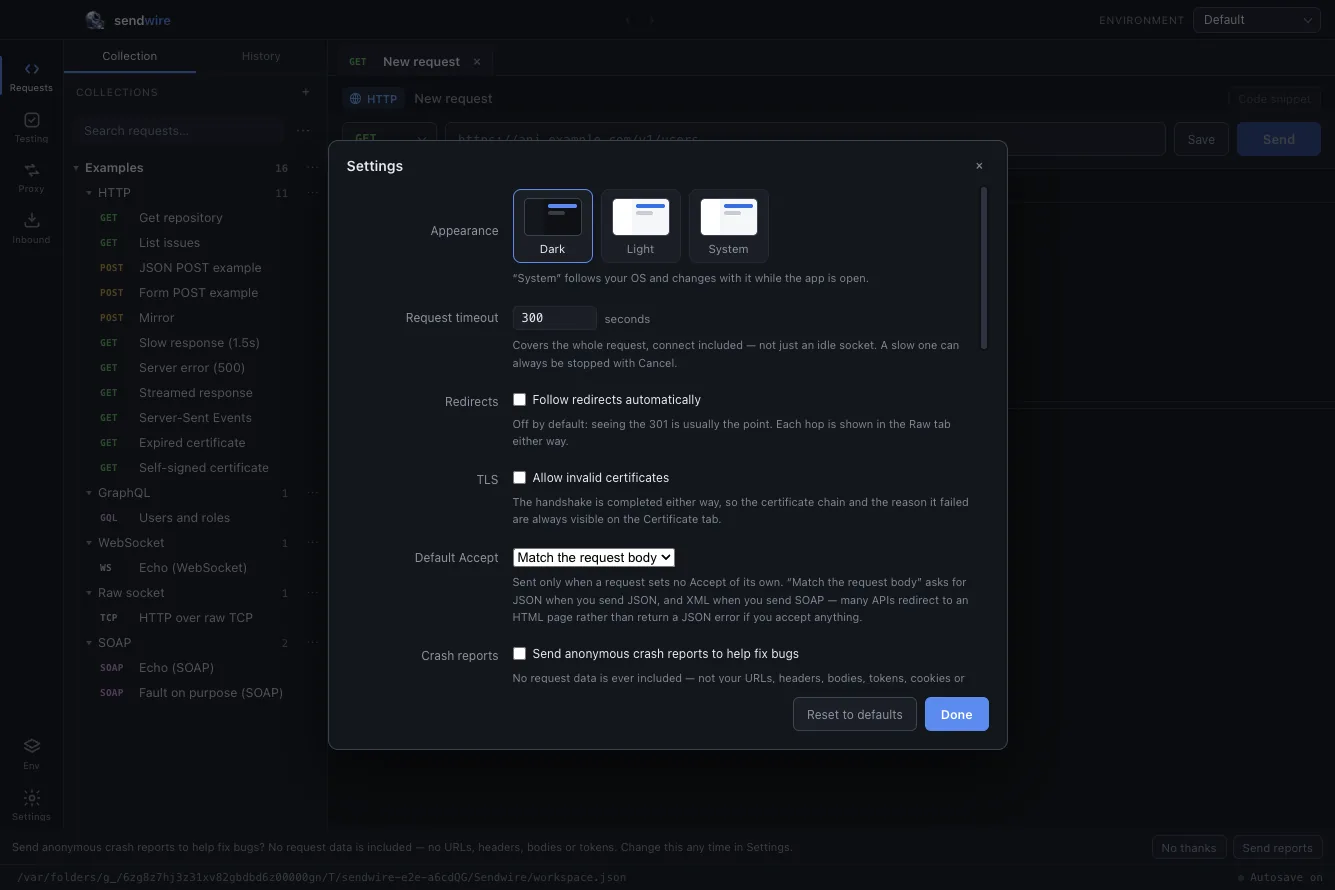
Settings at the foot of the activity rail (or ⌘, / Ctrl+,). Everything here applies to every request and is stored with your workspace, so your settings travel with the same file your collections do.
Requests
| Appearance | Dark, Light, or System — System follows your OS and changes with it while the app is open. |
| Request timeout | Seconds, covering the whole request including connect — not just an idle socket. A slow one can always be stopped with Cancel. |
| Redirects | Off by default: seeing the 301 is usually the point, and every hop shows on the Raw tab either way. Tick to follow automatically. |
| TLS | Allow invalid certificates completes the handshake regardless — but the chain and the reason it failed are always on the Certificate tab, so you rarely need this. |
| Default Accept | The Accept header sent only when a request sets none. Match the request body asks for JSON when you send JSON and XML when you send SOAP; application/json and */* are also options. |
Reset to defaults at the bottom restores the request settings above; it does not touch your collections or the sections below.
Per-request overrides
The settings above are the defaults for every request. When one request needs to differ — a self-signed staging box that should skip verification, an endpoint whose redirects you want to follow just this once — open that request's Settings tab and override them there, without changing the global defaults for everything else.
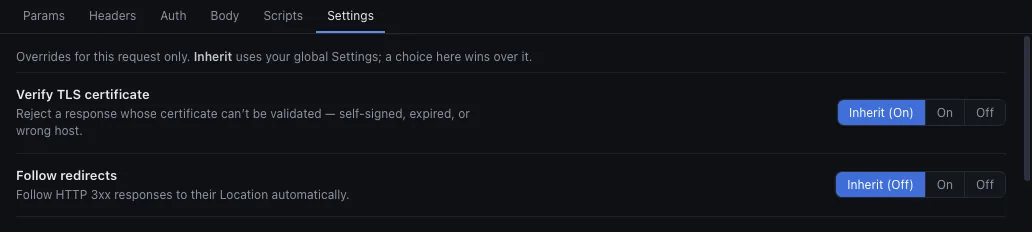
Each control is three-state, and defaults to Inherit — so a request you never touch carries no overrides at all:
| Inherit | Use the global setting above. The current value is shown in brackets, e.g. Inherit (On). |
| On / Off | Force this request one way, whatever the global setting says. |
Three things can be overridden per request:
- Verify TLS certificate — reject a response whose certificate can't be validated (self-signed, expired, wrong host).
- Follow redirects — follow
3xxresponses to theirLocationautomatically. - Maximum redirects — the cap on hops when following; empty inherits the default of
10.
A dot marks the Settings tab and any row you've overridden, so a request that behaves differently from your defaults is obvious at a glance. Reset all clears every override and returns the request to inheriting.
Privacy and diagnostics
| Crash & usage reports | Anonymous and scrubbed — no request data, no personal info. On by default; one click to turn off. See Privacy and data. |
| HTTP traffic log | A local JSONL record of every request Sendwire sends — method, URL, status, timing, no headers or bodies. On by default; Reveal log opens it. See the access log. |
| Cookies | The session's cookies, per domain, collected automatically and sent back to the host that set them — so a login authenticates the requests after it. Held for this session only; Clear per domain or Clear all. A Cookie header you set on a request wins over these. |
Network
| Proxy | How Sendwire reaches the network: Use the system environment (reads HTTPS_PROXY / HTTP_PROXY / NO_PROXY, like curl), Use this proxy (a manual URL and bypass list), or No proxy. An https request is tunnelled with CONNECT, so the certificate you inspect is still the server's own. |
| Capture proxy | The local port the capture proxy listens on (default 8899). Stop the proxy to change it. |
| Client certificates | The certificates presented for mutual TLS, matched per host — an exact host beats a *.wildcard. PEM (certificate + key) or a PKCS#12 bundle, with an optional passphrase. Only the path is stored; the key is read at send time and never leaves your machine. |
App
| Shell command | Installs sendwire and sw onto your PATH (~/.local/bin, or %LOCALAPPDATA%\Sendwire\bin on Windows) — the same commands the one-line install links, for when you installed by direct download instead. See the command line. |
| Updates | The exact version and build you're running, a manual Check for updates, and the toggle for the silent launch check. The download only happens from the update banner's Restart & Update — see Install. |
| Workspace | The path to the JSON file everything is stored in. |
| Reset workspace | Erases everything — every request, collection, folder, environment, history entry, suite, load run and browsed capture — back to a fresh install. It is fenced off, typed-to-confirm, and cannot be undone. |