
Appearance
Writing scripts
Two scripts run around every request: one before it is built, one after the response arrives. Both are on the Scripts tab.
They are JavaScript. Not a template language, not a restricted subset, not a builder UI with an escape hatch — if it runs in JavaScript, it runs here.
Pre-request
Runs before the request is assembled, so anything it sets is used.
js
const stamp = Math.floor(Date.now() / 1000)
sw.environment.set("timestamp", stamp)
sw.request.headers.upsert({
  key: "X-Signature",
  value: sw.crypto.hmacSha256(sw.environment.get("apiSecret"), String(stamp))
})
Post-response
Runs after the response arrives. This is where you capture values and assert.
js
const data = sw.response.json().data
sw.environment.set("orderId", data.id)

sw.test("the order was created", () => {
  sw.expect(sw.response.code).to.equal(201)
  sw.expect(data.status).to.equal("pending")
})
Anything stored with sw.environment.set is available to the next request as {{orderId}}. That is the whole mechanism behind suites.
Autocomplete
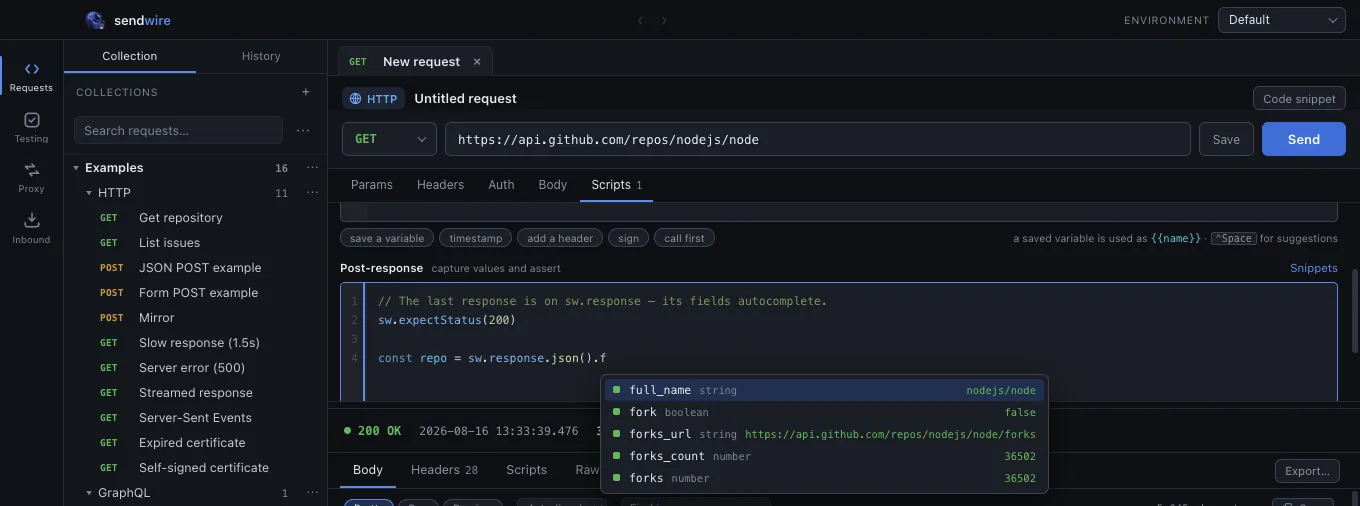
Type response.json(). and the fields offered are the ones the last response actually returned — with their types and their current values, not a guess from a schema.
⌃Space asks for suggestions anywhere.
Snippets
The Snippets button opens a library of the things people write most: capturing a token, signing a request, generating a timestamp, asserting a status. They insert at the caret.
Results
Every sw.test becomes a line in the Scripts tab of the response, and every sw.console.log appears beside it. In a suite run or on the command line, the same tests become the pass or fail.
Limits
Scripts run sandboxed with a time limit. There is no require, no import, no filesystem access, and no network except sw.sendRequest.
An accidental infinite loop fails that one request rather than freezing the application.
Exporting
A suite exports as a standalone Node script that carries your scripts across verbatim — it runs the same JavaScript against the same API, rather than trying to reconstruct what you meant. See code generation.