
The developer's HTTP client.
REST, SOAP, GraphQL, sockets, and a capture proxy in one application.
It sends the request and shows you the DNS lookup, the TCP connect, the TLS handshake, the certificate chain and every byte in both directions — so when a request misbehaves, you can see why.
Free · No account · Local-first
REST is the easy half.
Most clients treat anything that isn't JSON over HTTP as someone else's problem. Sendwire treats SOAP, GraphQL, WebSocket and raw sockets as first-class — one client instead of SoapUI, a GraphQL IDE, a WebSocket tool and netcat.
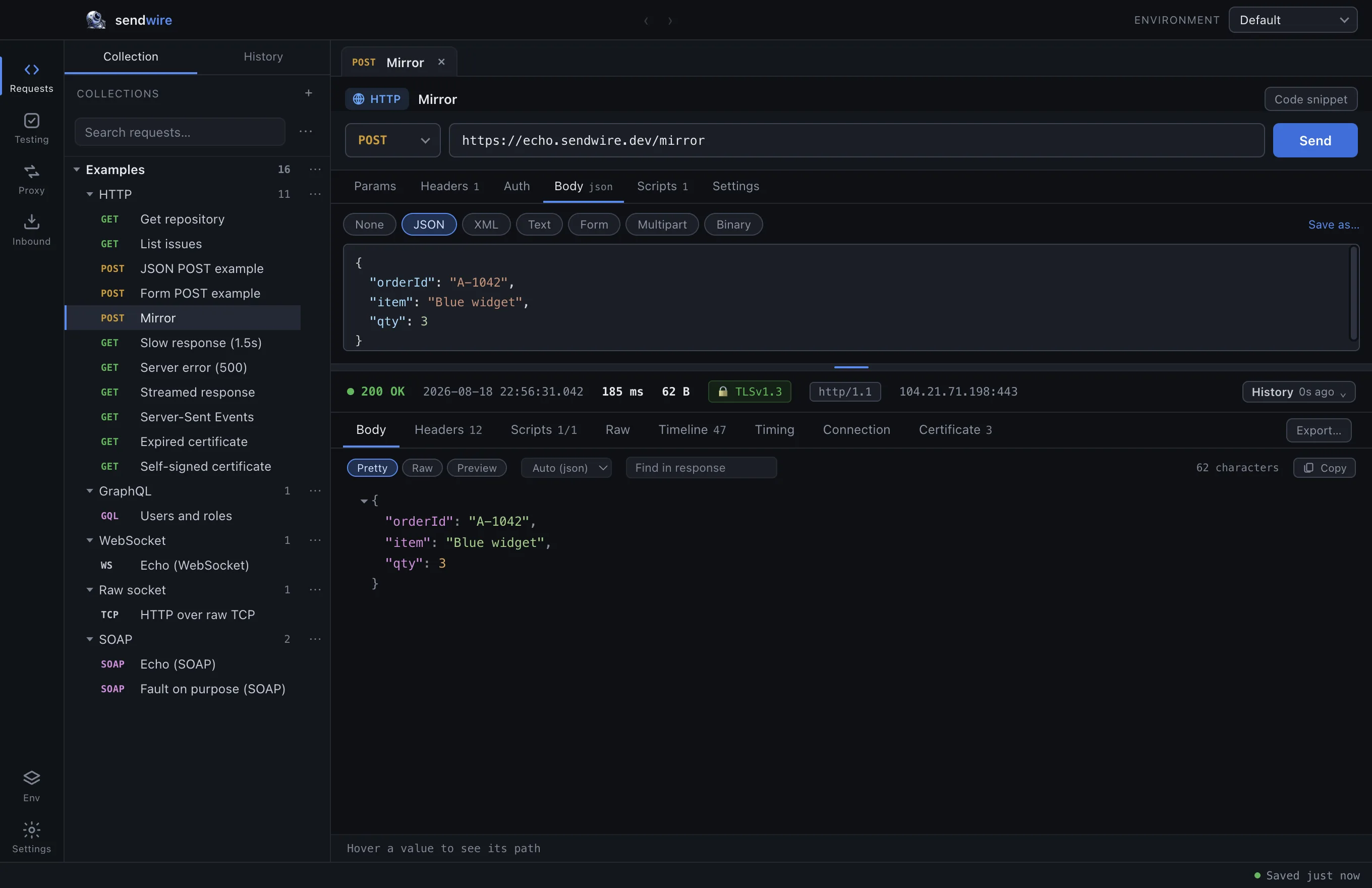
REST & HTTP
Every method, every body type, every auth scheme — plus the handshake underneath.
- Bodies: JSON, form, multipart, raw, file upload
- Auth: OAuth 2 (PKCE), mTLS, AWS SigV4, JWT, bearer
- Underneath: DNS, TCP, the TLS handshake, the cert chain
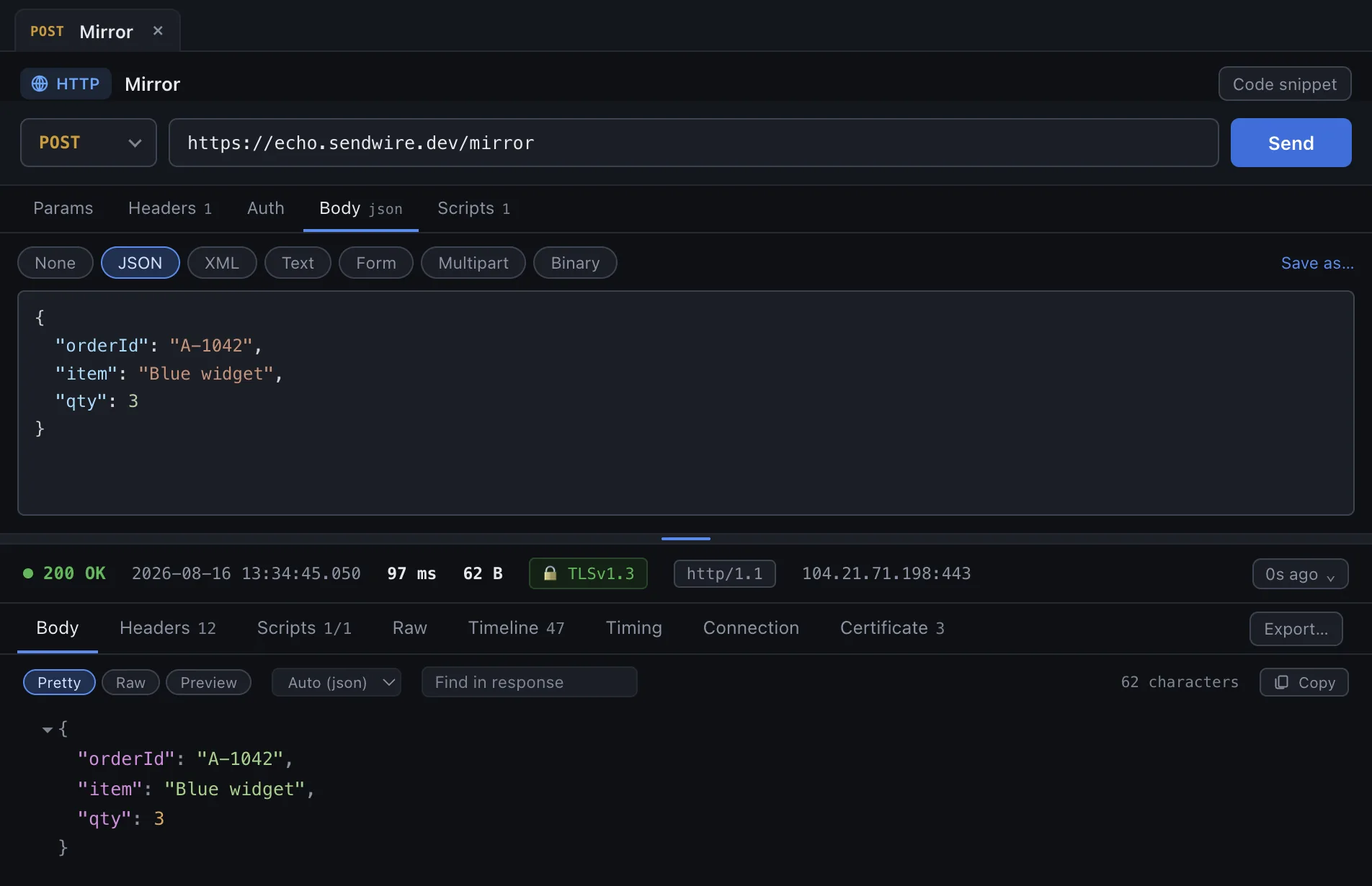
SOAP & WSDL
Point it at a WSDL. Every operation becomes a request with the envelope scaffolded.
- Import a WSDL — operations, types and SOAPAction filled in
- 1.1 and 1.2 handled properly, not guessed
- Faults parsed — code, string and detail, not XML soup
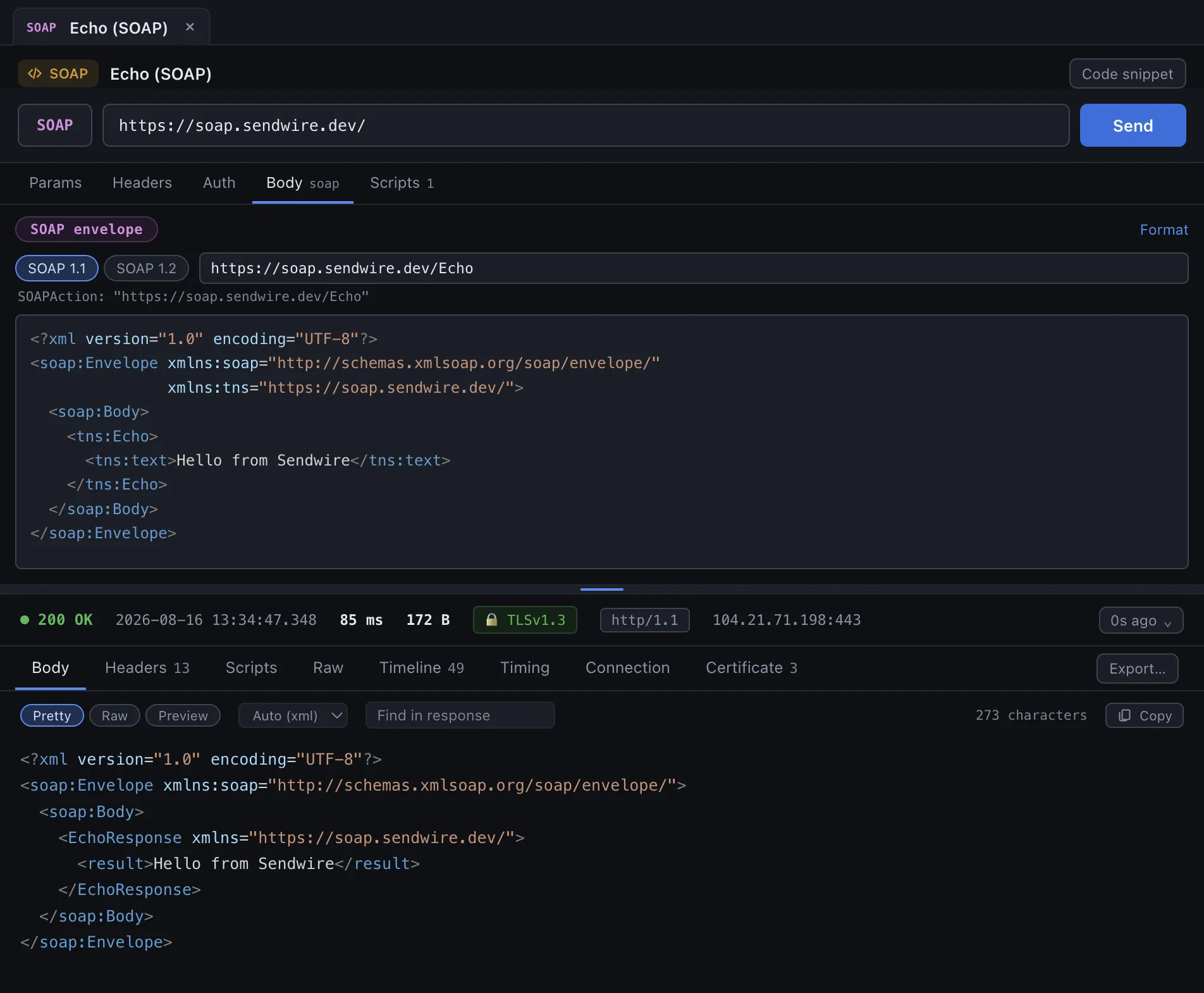
GraphQL
Schema-aware editing — completion and inline docs from introspection.
- Autocomplete fields, arguments and types as you type
- Variables pane kept beside the query
- Errors surfaced with their path, next to the data
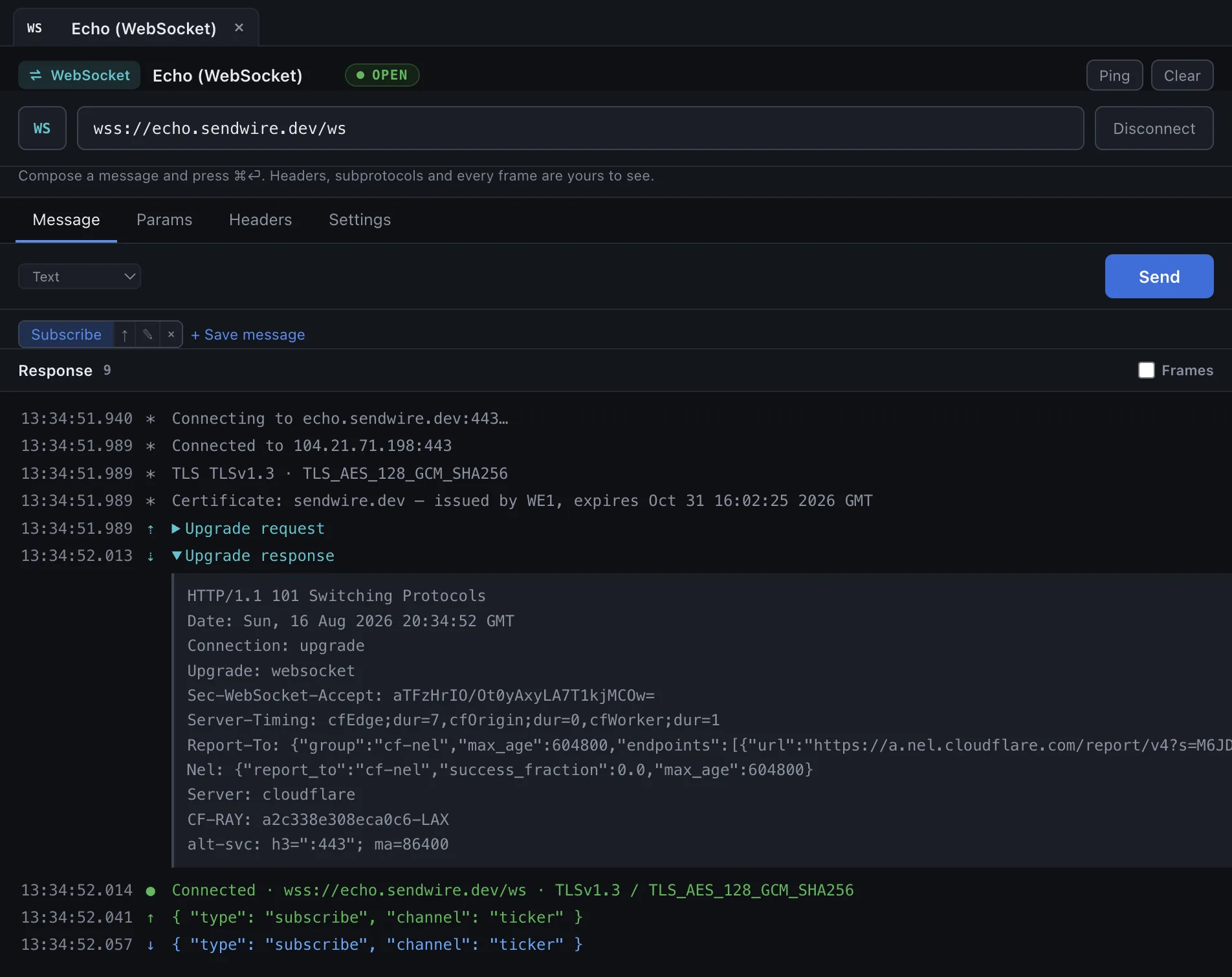
WebSocket
The upgrade, then a live frame log — send and receive, with close codes.
- 101 Switching Protocols shown, headers and all
- Every frame timestamped, in and out
- Close codes named, not left as a number
Raw sockets
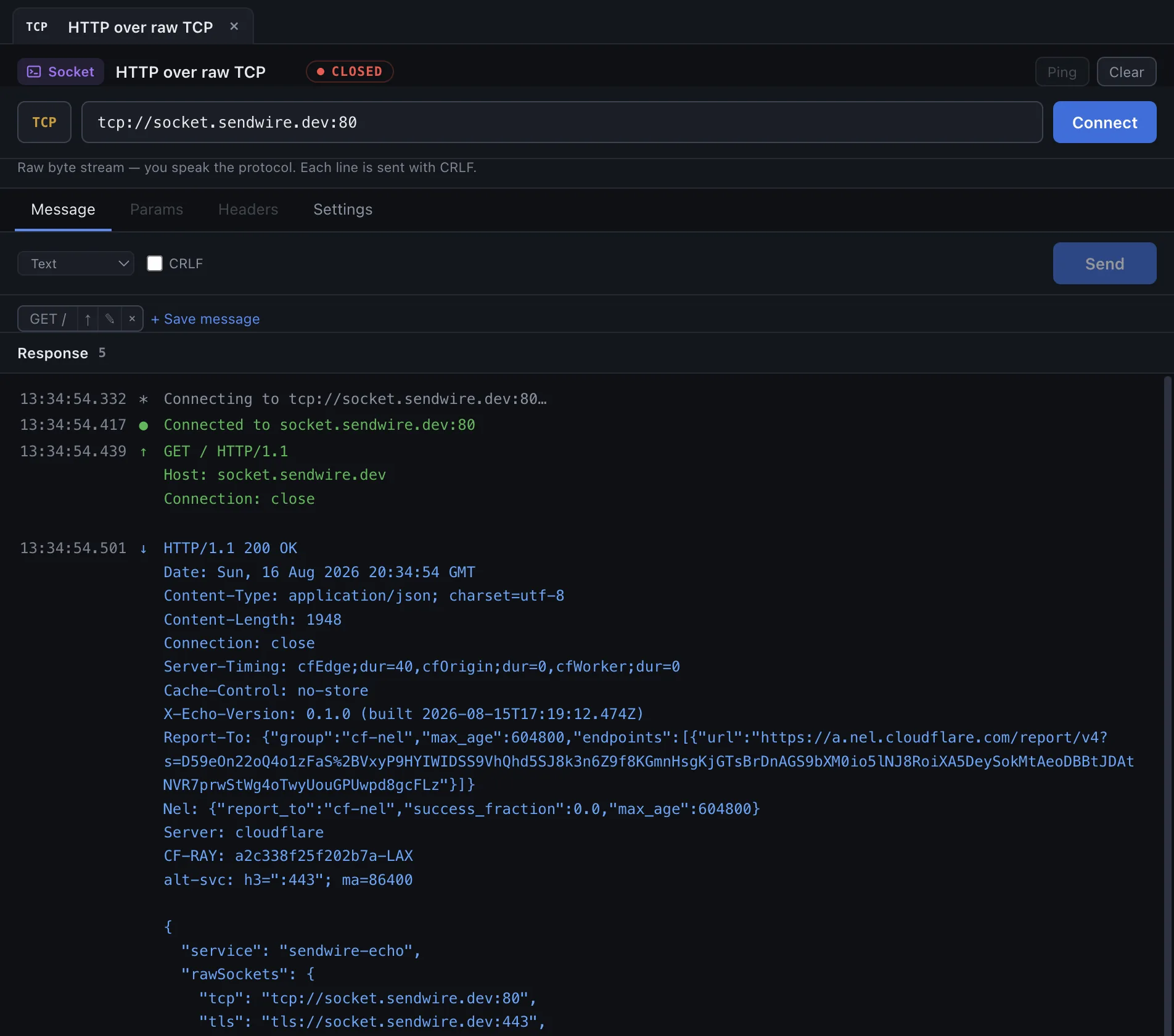
A plain TCP (or TLS) socket, bytes shown both ways — where netcat used to live.
- TCP or TLS — connect, then send raw bytes
- Hex + text for everything received
- Line or binary framing, your call
The whole exchange, not just the response body.
The raw HTTP exchange, all of it — the handshake, the certificate chain, every header in both directions. When an API call or an integration misbehaves, this is the one place that tells you why.
    0.3  * Resolving hostname api.github.com
   40.5  *   api.github.com → 140.82.116.5 (IPv4)
   80.2  * Connected to api.github.com (140.82.116.5) port 443
   80.2  * ALPN: offering http/1.1
  127.6  * TLS handshake complete
  127.6  *   version: TLSv1.3
  127.6  *   cipher:  TLS_AES_128_GCM_SHA256
  127.6  *   key exchange: X25519 253 bits
  127.6  * Server certificate:
  127.6  *   subject:     CN=*.github.com
  127.6  *   issuer:      CN=Sectigo Public Server Authentication CA DV E36
  127.6  *   expire date: Sep 29 23:59:59 2026 GMT (59 days remaining)
  127.6  *   certificate verify ok.
  127.6  *   chain depth: 4
  127.6  > GET /repos/nodejs/node HTTP/1.1
  127.6  > Accept: */*
  127.6  > Host: api.github.com
  377.1  < HTTP/1.1 200 OK
  377.1  < Content-Type: application/json; charset=utf-8
  377.1  < Strict-Transport-Security: max-age=31536000
-
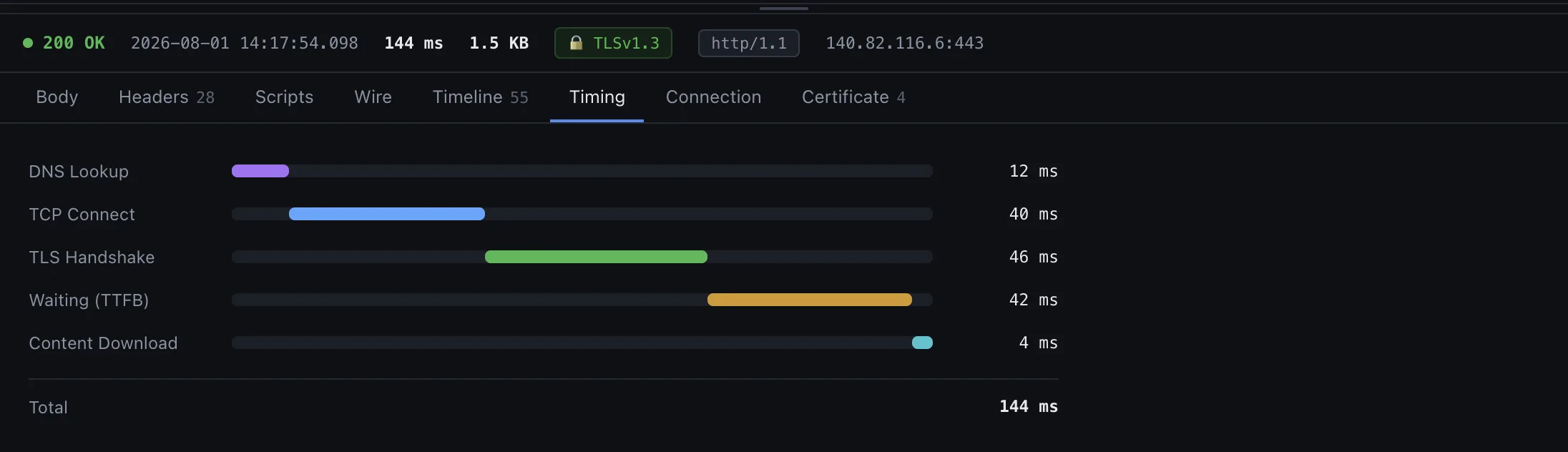
Where the time actually went
A waterfall splitting DNS, TCP, TLS, time-to-first-byte and download. When a call is slow, this is the difference between a slow server and a slow handshake.
-
The certificate chain, in full
Subject, issuer, validity, SANs and chain depth for every hop. Expiry is counted in days, because that is the number you actually needed.
-
Connection reuse, made visible
Whether keep-alive held, which IP answered, which ALPN protocol was agreed. A benchmark that silently reconnects every time is measuring the wrong thing.
-
Redirects you can inspect
Every hop is kept, with the method rewrites and the credential drops that RFC 9110 requires — rather than one opaque final answer.
Capture the traffic you didn't send.
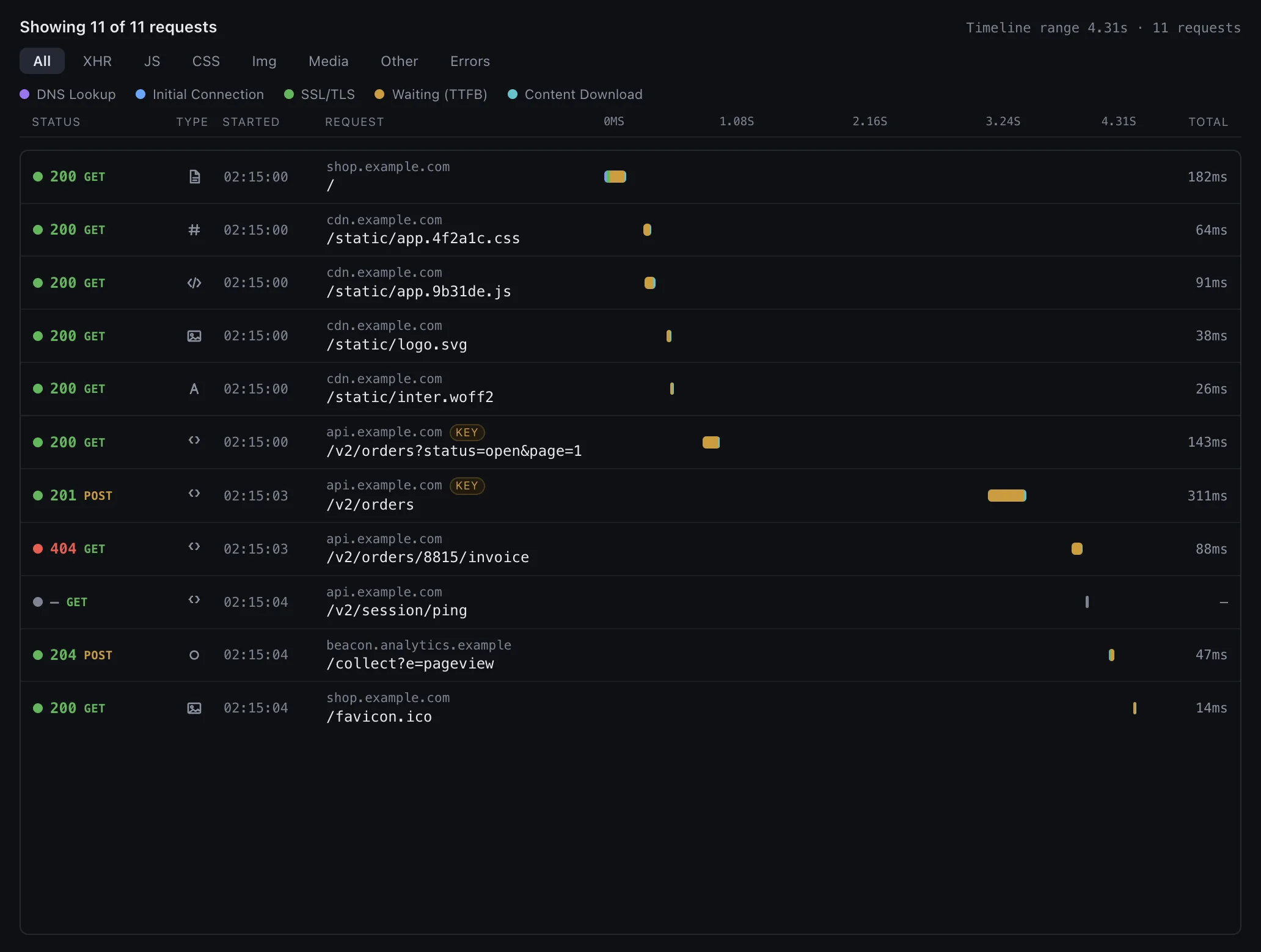
A built-in capture proxy: point a browser, an app, or a phone at it and watch real requests flow through. Hold any one at a breakpoint to rewrite it before it goes, turn on HTTPS decryption when you need the bodies, and open a capture straight into the editor to replay it. Bring a HAR someone sent you and it reads the same way.
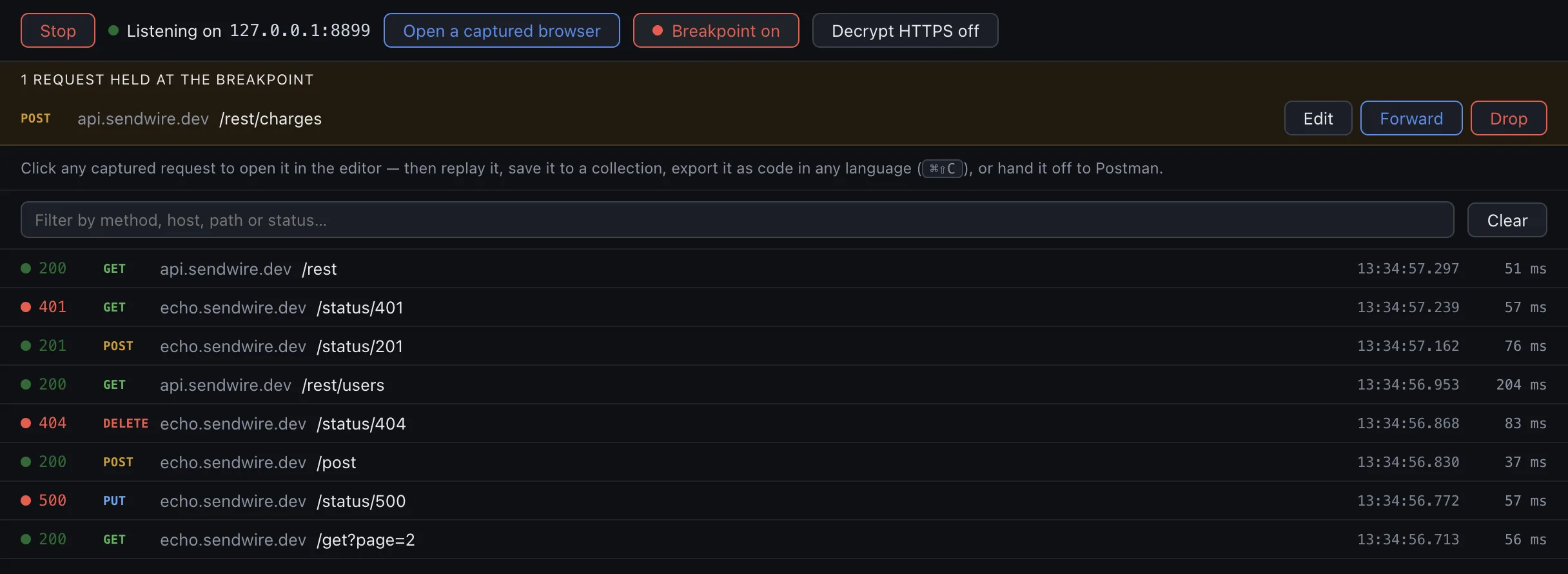
/rest/charges held at the breakpoint to rewrite before it goes, and a
401, a 404 and a 500 called out among the 200s. Click any row to open it in the
editor with the response it got.
-
Real traffic, live
Start the proxy and every request that passes through appears as it happens. Click one to open it in the editor with its recorded response, then replay it, save it to a collection, or export it as code.
-
Stop a request mid-flight
A breakpoint holds a request in the air so you can rewrite its method, URL, headers or body and forward it — or drop it. HTTP, and HTTPS once decryption is on — the same intercept-and-edit you'd reach for Burp or Charles to do, in the client you already send from.
-
HTTPS, decrypted only when you say so
Off by default. Turn it on and a local CA opens HTTPS bodies in full; a browser Sendwire launches trusts it automatically, or install the certificate on a phone. Nothing is decrypted until you opt in.
-
A throwaway browser, or your phone
Launch a Chrome pointed at the proxy in a disposable profile — no system settings touched, nothing to clean up — or flip one toggle to let a phone on the same Wi-Fi route through the computer.
Coming from Postman? Bring all of it, in one file.
Postman’s Settings → Data → Export Data writes every collection and every environment into a single file. Sendwire reads that file — folders, variables and, the part that usually does not survive a move, your scripts, rewritten rather than dropped. It also writes it, so leaving is the same one file.
Postman collections
v2 collections, with pre-request and post-response scripts rewritten from
pm to sw on the way in — and back again on the way out,
so a collection you export runs in Postman rather than throwing on every
request. Anything with no equivalent either side is named before the file is
written, not discovered afterwards.
Individually, or the whole data export at once. Environments and globals come
with it; globals arrive as an environment named for what they were, because we
have no wider scope to put them in.
OpenAPI 3
JSON or YAML, grouped by tag, with parameters and body examples filled in.
WSDL
Every operation as a request, envelope scaffolded and SOAPAction set.
cURL
Paste a command — or whatever your browser's “Copy as cURL” gave you.
HAR
A browser's network export, browsable. Click any request to open it exactly as it was sent, with the recorded response already on screen.
Swagger 2.0
Translated to OpenAPI 3 on the way in, so host, basePath,
body parameters and formData arrive as the requests they describe
rather than as something approximate.
Ask Claude. It opens in Sendwire.
Point Claude at a curl command, a request in your logs, or a proxy capture — it reads the call (and the response it got) and opens it in Sendwire for you, built and ready to re-send. No file to find, no double-click. It imports whole OpenAPI specs and Postman collections too, and exports everything back out. One small Skill, or File → Add Claude Skill in the app.
you  add this HTTP call to Sendwire — it's in our
     server logs at ~/logs/export.txt

Claude  Found the POST to /v1/orders and its 201 response.
     Done — opening it in Sendwire.

     ↳ Sendwire comes to the front, the request built and
       its response already beside it.
Scripts are JavaScript. All of it.
Not a template language, not a subset, not a builder UI with an escape hatch. If it runs in JavaScript, it runs here — and the editor colours it with VS Code's own grammar and themes.
// Capture the session token for the next request.
const data = sw.response.json().data;
sw.environment.set("token", data.token);

// Sign the next call with an HMAC of the user object.
sw.environment.set("sig", sw.crypto.hmacSha256(
  sw.environment.get("apiSecret"),
  JSON.stringify(data.user)
));

for (const key of Object.keys(data)) {
  if (/^user_/.test(key)) sw.console.log(key);
}

sw.test("session is active", () => {
  sw.expect(sw.response.code).to.equal(200);
});
-
Autocomplete from the real response
Type
response.json().and the fields offered are the ones the last response actually returned — with their types and their current values, not a guess from a schema. -
One namespace, and it's
swImporting a Postman collection rewrites
pmautomatically. Type it anyway and the editor underlines it before you ever hit send. -
Export it and run it anywhere
A suite exports to a standalone Node script that carries your scripts across verbatim — because it runs the same JavaScript, rather than trying to reconstruct your intent.
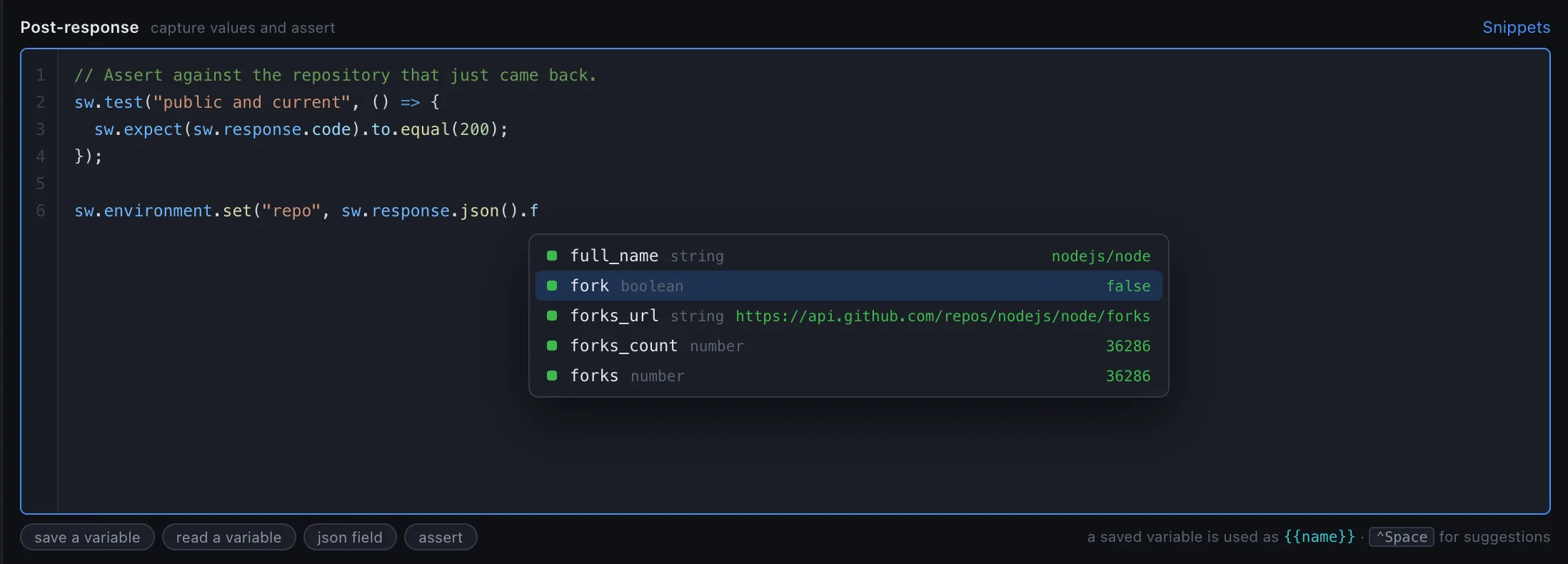
nodejs/node GET this page opens with.
Test suites, built in — and load testing from the same steps.
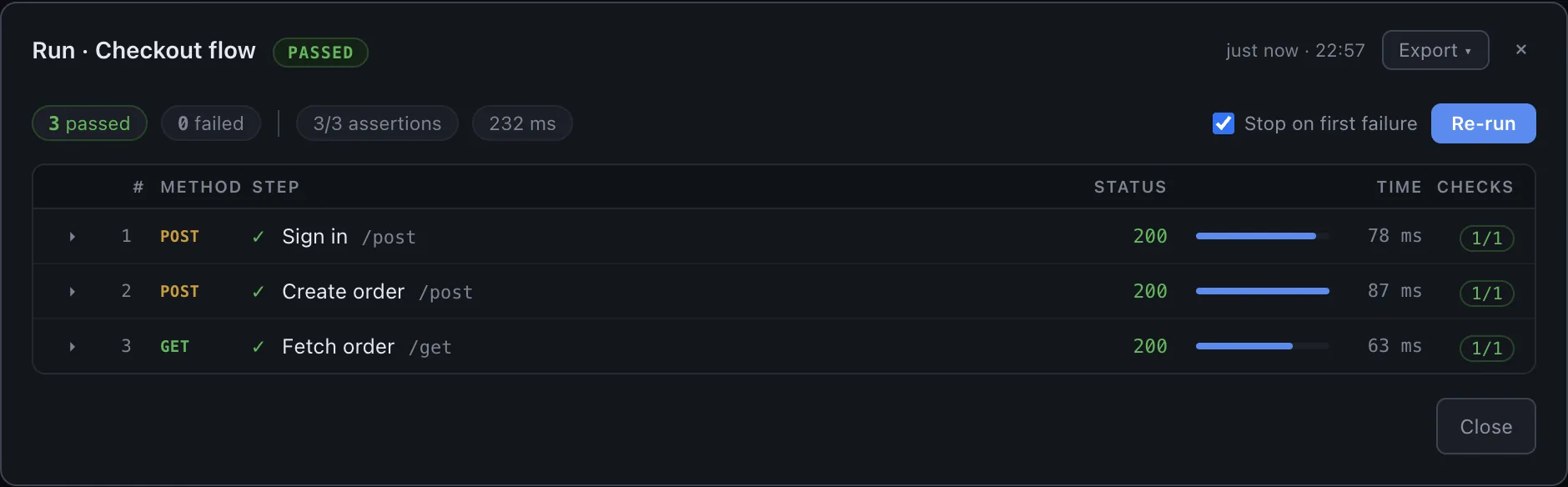
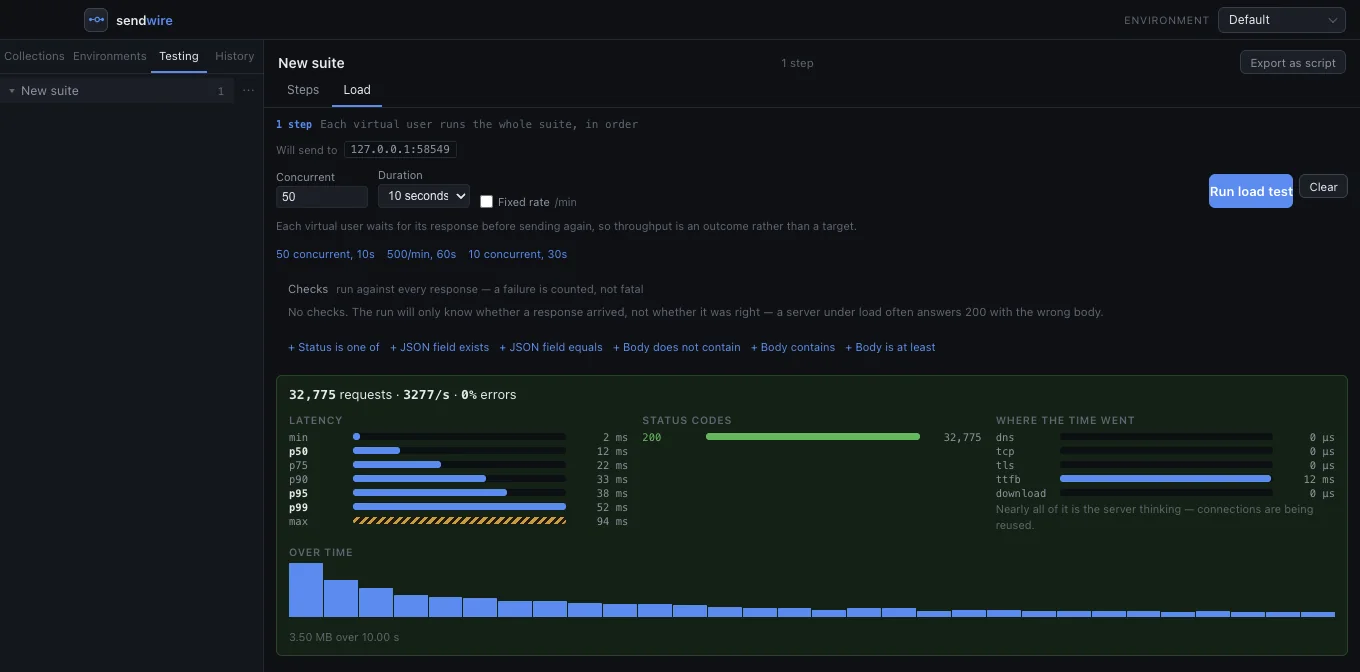
Chain requests into a suite so a value captured in one is spent by the next, and assert on every response — a pass or fail you can gate a build on. Then point a load test at that same suite when you need to know it holds up. No second tool, no exporting, no writing a k6 script.
-
Steps that pass state along
Each step is a real request, and a value captured in one — a token, an id — is spent by the next. A log-in-then-call flow is a single suite that asserts as it goes, not a fixture you maintain by hand.
-
Checks, not just status codes
Assert on the body of every response. A service under load will happily answer 200 with an error page, and a run that only counted status codes would call that a pass.
-
Where the time actually went
DNS, TCP, TLS, time-to-first-byte and download, broken out across the whole run — so "it got slow" becomes "the handshake got slow".
Export it — to twelve languages, or a script that runs anywhere.
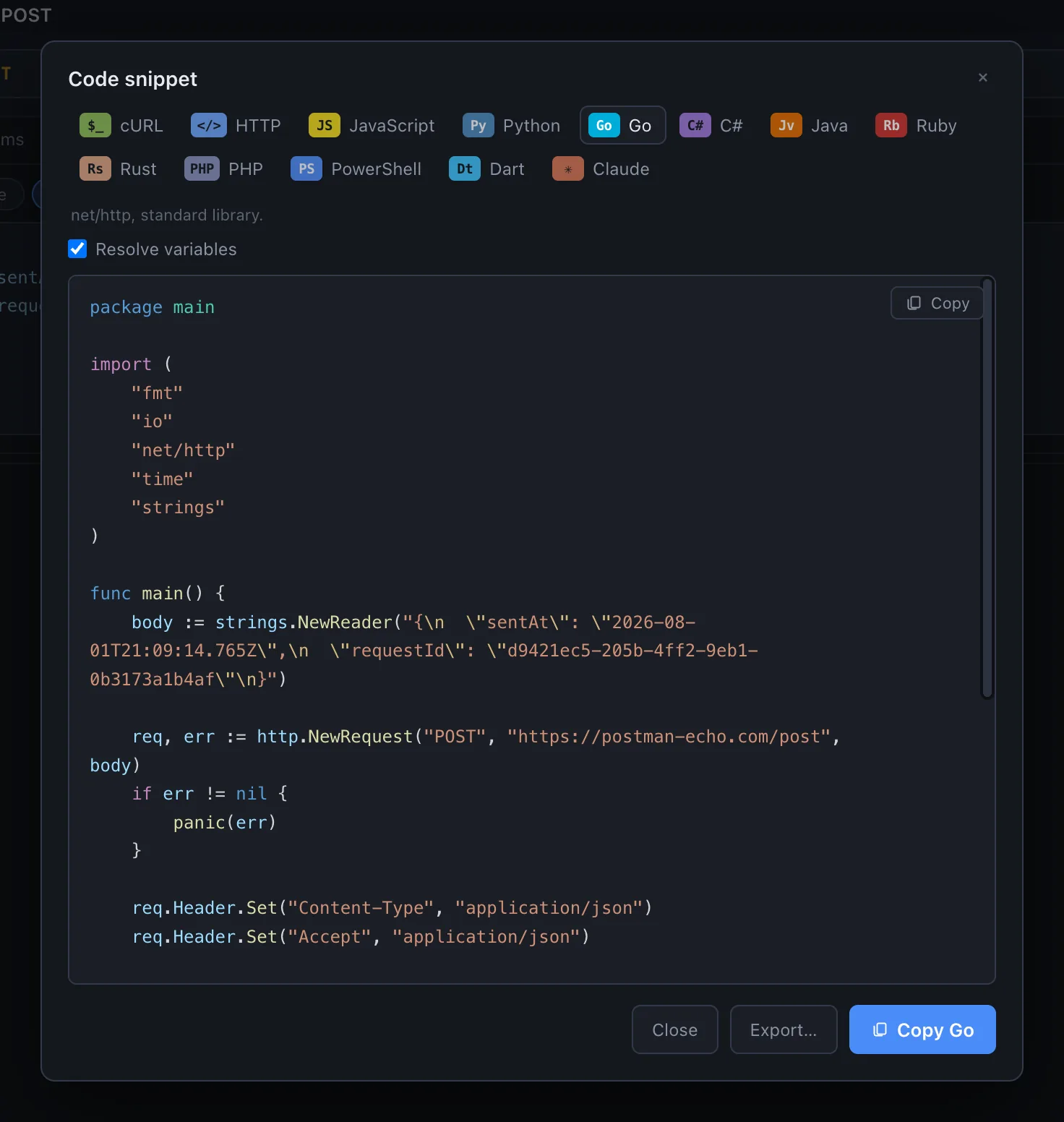
A request becomes cURL, Python, Go or any of ten others. A whole suite becomes a standalone Node script. A collection becomes one file. And the workspace was a readable JSON document the entire time.
-
The request on screen, as code
cURL, HTTP, JavaScript, Python, Go, C#, Java, Ruby, Rust, PHP, PowerShell and Dart — plus a written brief for Claude. Variables resolved so it runs as-is, or left as
{{name}}so it stays a template. Copy it, or save it. -
A suite becomes a Node script
Steps in order, values captured from one response and spent in the next, and your own JavaScript emitted verbatim rather than reconstructed. It runs the same code because it is the same language.
-
Collections travel as one file
A bundle carries its environments with it, so what arrives at the other end is not full of unresolved
{{variables}}— and what goes into it is chosen explicitly, so a secret never rides along by accident. -
And the workspace was always yours
One JSON file on your disk. If Sendwire vanished tomorrow you would still be able to read every request you ever wrote, in any text editor.
Built like the tool it is.
An HTTP client is where you go when something is wrong. It should be the one piece of software that never makes you wonder whether it is the problem.
-
Zero native dependencies
The whole engine is Node's own
http,tlsandnet. Nothing to compile, nothing to break on upgrade, no binary blobs in the package. -
Your workspace is a JSON file
On your disk, at a path the app will tell you, saved as you type. No account, no sync, no cloud that can go down or change its pricing.
-
No nag screens
No account, no sync, no “rate us,” no feedback prompts. It opens, it does its job, and it gets out of the way.
Read the docs without installing anything.
Written by hand, complete, and already live — so you can check whether it does what you need before it touches your machine.
sw API.
SOAP & WSDL
Envelopes, SOAPAction, faults, 1.1 and 1.2.
WebSocket & raw sockets
Frames, opcodes, close codes, bytes.
Authentication
OAuth 2, mutual TLS, SigV4, JWT and the rest.
Load testing
Concurrency, arrival rate, thresholds.
Command line
The same runs, in CI, with a real exit code.
Importing
Postman, OpenAPI, cURL, WSDL and HAR.

Take a light to the deep end.
Every byte, every layer — the parts other clients leave in the dark. Free, no account.
One command on macOS & Linux, or pick a build — on the download page. ⌘P jumps to any request in the app.